Test an AI wardrobe app with clothes you actually own
A repeatable protocol for a real closet, with a blank worksheet. Record what an app does before deciding whether its suggestions are useful.
Quick answer: test an AI wardrobe app by adding a small set of your clothes, correcting one item, requesting an outfit with a constraint, and inspecting the saved result. If you also need virtual try-on or travel planning, test those separately. Use the same inputs when comparing apps, record unavailable features, and check the actual clothes before accepting a suggestion.
This guide is published by SELION.AI. It is a first-party evaluation protocol, not an independent ranking or a report of completed tests. The examples are input briefs and acceptance checks. No app receives a score here. The blank CSV results worksheet is usable with SELION or another wardrobe app; its result cells are intentionally empty.
Prepare a small, identifiable wardrobe
Choose a working set you could wear this week: for example, two tops, two bottoms, a layer and two pairs of shoes. This is a convenient test fixture, not a minimum upload requirement or a promise about a free allowance. Give each garment a short identifier such as NAVY-JACKET or WHITE-SHIRT. Keep one photo of each actual item, with enough light to distinguish its shape and color.
Include one item whose details you can correct, such as a lightweight shirt that might be classified as an overshirt. Write the expected category, color and practical warmth in your own notes. You are checking whether the record can be corrected and reused, rather than awarding recognition accuracy from a tiny sample. A different picture, crop or garment can produce a different result.
Record the app version, platform, date, language, account tier and any allowance or price displayed. Stop at a paywall if you do not want to purchase. Mark that step unavailable on the selected tier instead of assuming the entire product lacks the feature. Do not use another person's wardrobe or portrait without their permission.
Test 1: photo, correction, saved item
Open the clothing-add flow and submit the selected garment photo. Compare the proposed fields with your notes, correct the ambiguous category, and save. Leave the screen and reopen the saved item. The useful observation is whether the corrected value remains in the actual record. A plausible recognition summary is not sufficient evidence of a saved wardrobe item.
In SELION, the clothing-photo workflow connects to an editable digital wardrobe. Check the fields your version exposes and note any correction you cannot make. Do not assume recognition knows measurements, care instructions, exact materials or an item's current condition from its appearance.
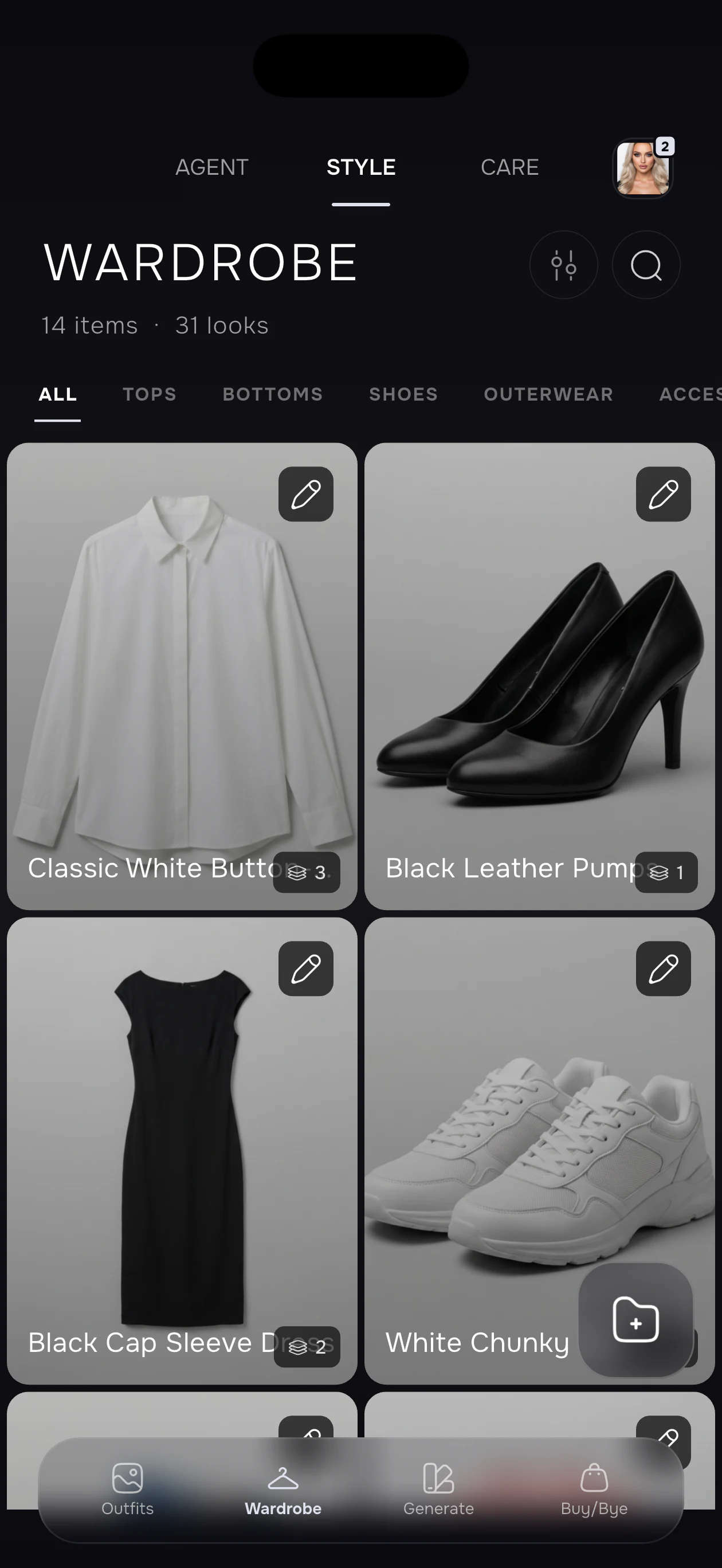
In the worksheet, enter the original proposal, your correction and the value seen after reopening. If saving fails, retain the error and mark this test incomplete. Avoid silently replacing a failed input with a cleaner photo and presenting the second attempt as the only attempt.
Test 2: a constrained request and a checked action
Use my saved wardrobe for a business-casual day. Keep NAVY-JACKET, avoid WHITE-SHIRT because it is in the wash, and suggest an outfit with comfortable flat shoes. Explain which items you selected and what you cannot verify.
Replace those identifiers with your own records. In a wardrobe-aware stylist, inspect whether the selected pieces exist and whether the excluded item was used. If an app supplies only prose, record that. If it offers an eligible action, follow the confirmation flow shown in the current version and inspect the resulting outfit or plan screen. An offered action, a confirmation and a saved result are distinct observations.
Change one constraint in a new request: keep the same jacket but ask for a warmer removable layer. Record whether the answer changes for the stated reason. A repeat later in a fresh conversation can help you assess useful retained preferences; one response does not establish long-term memory reliability. For wording ideas, see the AI stylist prompt guide.
When testing the outfit generator, distinguish owned items from an inspiration-only direction. Match the selected garment records to the real pieces. Generated imagery may change texture, color, silhouette or details, so do not use an attractive render as proof that the app used the requested inventory exactly.
Test 3: virtual preview and physical fit
Use one clear photo of yourself and one selected clothing direction in the virtual try-on flow. Record the garment and portrait inputs, the visible output, and any changed detail you can identify. Inspect hands, edges, layering, pattern continuity and identity. Mark ambiguous details instead of describing them as correct.
Then write a separate physical check: does the real garment fit at the shoulders, allow movement, feel comfortable and have suitable length? If you do not have the garment to try on, mark those checks unknown. A generated preview does not measure size, fabric behavior or pressure, and it cannot establish return eligibility. Keep an actual fitting or retailer measurement check in the purchase decision.
This separation is useful even when a preview looks convincing. Visual direction and physical suitability answer different questions. A test report should show both, including unknowns, rather than combining them into a single unexplained “accuracy” percentage.
Test 4: a trip brief and a reviewed packing list
Plan a three-day city trip using my saved clothes. I will walk each day, have one informal dinner and have no access to laundry. Use removable layers. Ask for any missing forecast information before finalizing the list.
This is an illustrative brief, not a measured customer trip. Add the real dates, destination, forecast and luggage constraints when you perform it. In SELION's Trip Planner, review each day and the connected packing list. Check that repeated outfits do not require duplicate garments and that underwear, footwear and practical layers are accounted for where needed.
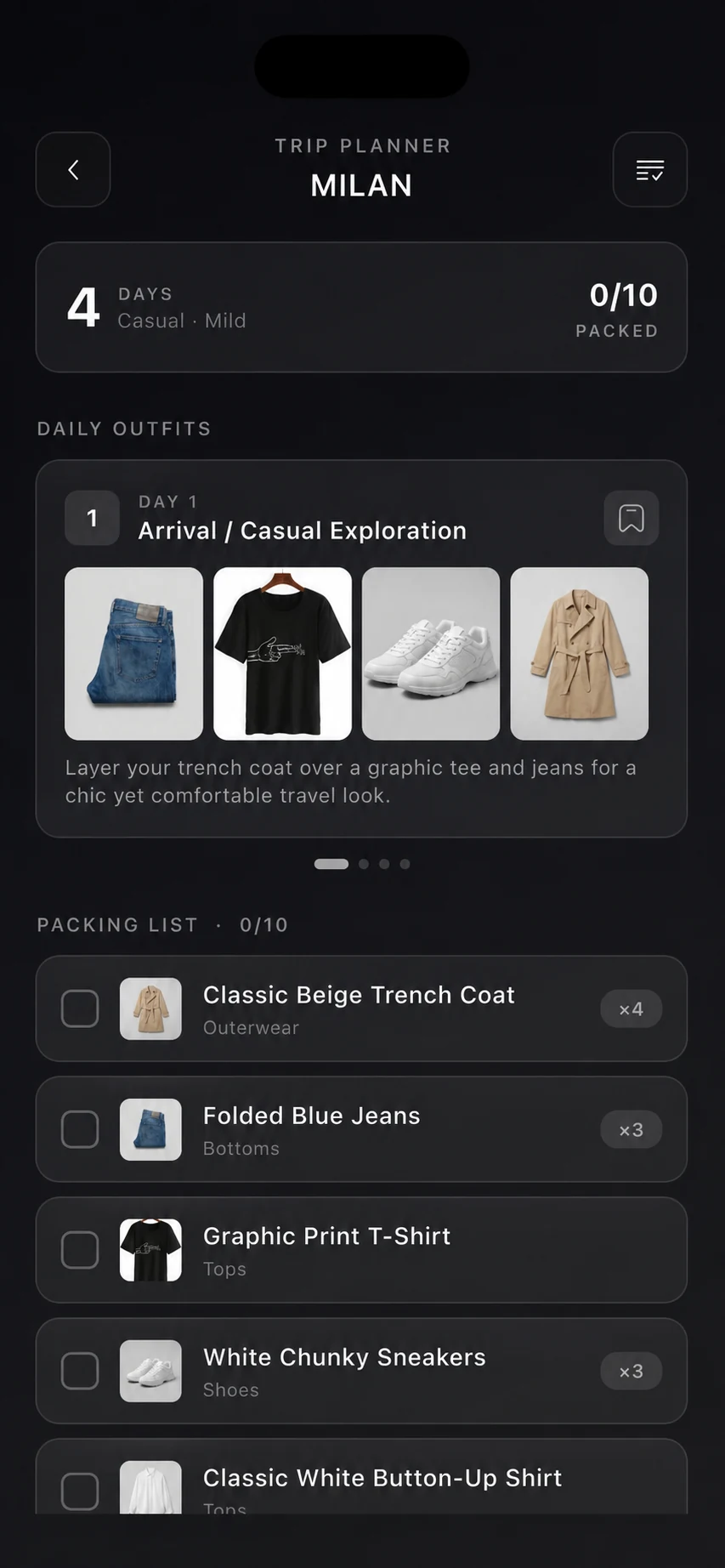
Check the actual forecast and your clothes before packing. A saved jacket may be at another address; a proposed shoe may be unsuitable for the walk. Record any missing information and the manual correction required. These are meaningful limits of the workflow even when the generated list is readable.
Record evidence without inventing a winner
The CSV worksheet has a row for each test, with space for version, tier, inputs, expected observation, actual result, evidence and limitation. Copy rows for another app or a repeat. Use “not run,” “not available on this tier,” “failed,” or “completed” according to what happened. Empty results are not failures and should not be converted to zero scores.
Compare the steps that matter to your routine: correction persistence, constraint handling, visible action completion and the amount of review needed. A single useful outfit may matter more than a large feature menu. If a step fails, note the actual error and whether a retry changed the result. Do not generalize a small personal exercise into a universal market ranking.
Product descriptions and store links were reviewed on November 4, 2026. SELION is available through the Apple App Store and Google Play. Feature availability, paid packages and allowances depend on the version, platform, account and purchase screen. This protocol does not promise a fixed free quota.
Before uploading photos, read the current privacy policy and store disclosures. Use support to report an observed failure, with the app version and reproducible steps. Our editorial methodology explains how first-party product descriptions, examples and external claims are distinguished.
Give SELION Agent a real wardrobe task
Start with a small editable wardrobe, describe the outcome once, and review the action and result.
View official download optionsFrequently asked questions
How many clothes should I upload for a test?
Use a small set that can form complete outfits for your routine. The example fixture is illustrative, not an upload minimum or a claim about a free allowance.
Does the worksheet rank apps?
No. It records your inputs, actual results and limitations. No result or score is prefilled.
Can virtual try-on prove fit?
No. Keep the generated visual preview separate from measurements, an actual fitting and comfort checks.